A Webring Connects Personal Sites Through Shared Navigation
A webring is a group of separately maintained websites connected through shared navigation links, commonly offering previous, next, random, or member-list destinations. Rather than relying on centralized search engine rankings to surface content for a broad query, this structural topology allows one relevant personal homepage to act as a direct portal to related sites curated around a specific shared interest.
When cataloging web finds, recovering a single node in a ring theoretically exposes the entire neighborhood. In practice, time degrades hypertext networks unevenly. You must establish three distinct categories of evidence before claiming a discovery: working ring navigation, a surviving membership badge on an active site, or an archived ring page preserved in a repository. A visible graphic button establishes a historical membership claim, while following its destination URL supplies separate evidence about whether the routing script still functions.
An old badge alone never proves that its underlying ring navigation still works. Many early rings relied on centralized CGI scripts or third-party hub domains to calculate the next or previous site in the sequence. When those central brokers expired, the individual personal pages remained online with dead HTML tables anchored to their footers. Treating those surviving static badges as living directories misrepresents the current state of the network, though the badges themselves remain valuable lexical footprints for search queries.
Search for the Words Webring Navigation Leaves Behind
Because surviving member pages retain the boilerplate text of their navigation bars, we can locate them by querying the exact phrases embedded in those HTML snippets. Standard search engines index the visible anchor text of old ring tables alongside the page's primary subject matter. You can systematically surface these remnants by pairing a subject keyword with quoted footprint strings, adjusting one component at a time to observe how the index responds.
| Query | Intended Purpose | Adjustment if Results Are Sparse |
|---|---|---|
| astronomy "webring" | Find the interest beside the common single-word ring term. | Adjust to astronomy "web ring" to test the two-word spelling. |
| astronomy "join this ring" | Look for recruitment or membership wording on hub or footer blocks. | Return to a shorter quoted footprint if the exact phrase excludes pages using different labels. |
| intitle:webring astronomy | Seek a ring term directly in page titles (operator support and interpretation vary by engine). | Drop the title operator and run the terms in the general body query. |
| astronomy ("webring" OR "web ring") | Combine both spellings into a single pass on engines supporting boolean grouping. | Break back into two separate sequential queries when grouping behaves inconsistently. |
| astronomy "webring" -pinterest | Remove a recurring distraction after observing it in the initial results. | Remove the exclusion again to inspect what legitimate pages it might hide. |
Start with the interest and a quoted footprint: astronomy "webring". Comparing this directly against astronomy "web ring" accounts for early webmasters who treated the concept as two distinct words. Once you test the basic nouns, shifting to longer action phrases like astronomy "join this ring" exposes dedicated membership sign-up pages or verbose footer templates, though demanding exact wording will naturally exclude pages that phrased their invitations differently.
When applying advanced search operators, keep the operator attached directly to its value without an intervening space, as in intitle:webring. You can review Google's guidance on refining searches for baseline syntax rules, bearing in mind that parser behavior shifts across different search platforms. Introduce negative exclusions like -pinterest only after a specific domain floods your results, and periodically test your query without the minus sign—excluding a word removes any authentic amateur directory that happens to mention the excluded term on its links page.
Narrow a Promising Host Without Losing the Wider Ring
A query succeeds when it surfaces a structural lead: a personal homepage, a curated links collection, a ring membership roster, or a footer containing recognizable previous and next navigation controls. When one of these pages appears, inspect its domain architecture before running your next search. The domain structure determines how you scope your follow-up operator.
We can contrast two distinct scoping approaches depending on the URL you uncover. If the page sits on an individual personal-site domain, applying a domain restriction concentrates solely on that single author's subpages. If the page resides on a shared hosting domain—such as an old university server, a community freenet, or a surviving tilde club, restricting your search to that host searches across neighboring personal sites hosted on the same machine.
Pick the shared host restriction when you want to uncover parallel hobbyist directories living on the same server infrastructure. You execute this using the syntax demonstration site:example.org "webring", replacing example.org with the actual host encountered in your search results. While a broad host restriction can uncover neighboring sites maintained by peers in the same web space, it will also pull in unrelated pages that happen to share the server, and remember that a site-restricted query retrieves only indexed matches rather than a complete inventory of the host.
Whenever a promising page loads, extract four core discovery details before clicking away: the exact ring name, the member-page URL, the underlying navigation destination URLs embedded in the links, and any visible date on the document. Always keep the page's visible timestamp separate from your own date of discovery. Once an exact ring name appears inside a badge or text block, strip away the host restriction and search that exact title in quotes alongside your subject term to locate members hosted elsewhere on the web.
Traceable Query Logs
Save the exact query string, the date of discovery, and every useful URL in a plain-text log as you work. Recording each step ensures an unsuccessful branch can be retraced without repeating dead-end searches.
Use Archived Ring Pages to Recover Names and Destinations
When a live personal page displays a broken ring hub address, or when a search result points to a dead directory URL, the Internet Archive's Wayback Machine provides a mechanism for inspecting historical captures of that specific address. Archival crawling has never been exhaustive; it cannot guarantee complete coverage or a saved snapshot for every URL you feed it. However, a single preserved capture of a central ring hub or member roster often contains the raw plain-text links needed to reconstruct the circuit.
- Copy the defunct ring hub or membership-page URL directly from the surviving HTML source or search snippet.
- Query that exact address in the Wayback Machine to check for an available historical capture.
- Inspect the captured document's member list and navigation labels to see how the ring organized its sites.
- Transcribe the original destination URLs belonging to the participating member sites.
- Extract each original member URL from the archive wrapper and test it in a separate live browser tab.
Testing a recovered destination requires strict separation between archival evidence and live network status. If you simply click a "Next Site" button inside an archived capture, the browser may stay trapped within historical captures, fail on missing scripts or unarchived visual assets, or hit an unavailable central redirection service. Record exactly which behavior occurs during your inspection.
To verify whether a listed member site still exists on the live web, strip the archive's prefix string from the link and attempt to load the extracted original URL directly. Retaining both the archived capture address and the extracted original member address keeps the provenance of your lead traceable. Similarly, store the archive capture date and the page-displayed "last updated" text as two completely separate observations. For example, if an archived astronomy ring roster yields a member URL that still loads but whose "Next Site" link fails, the log records a recovered live member page and broken ring navigation, alongside the capture date and the page's own update text.
Check Whether the Ring Works Beyond Its Surviving Badge
Finding a surviving homepage with an intact footer graphic is a triumph of archival sleuthing, yet it tells us very little about the operational state of the ring itself. When evaluating surviving sites, I separate the verification phase into three distinct empirical claims: whether the member page loads today, whether the ring's navigation controls successfully reach another relevant member, and whether the ring shows verified evidence of recent maintenance.
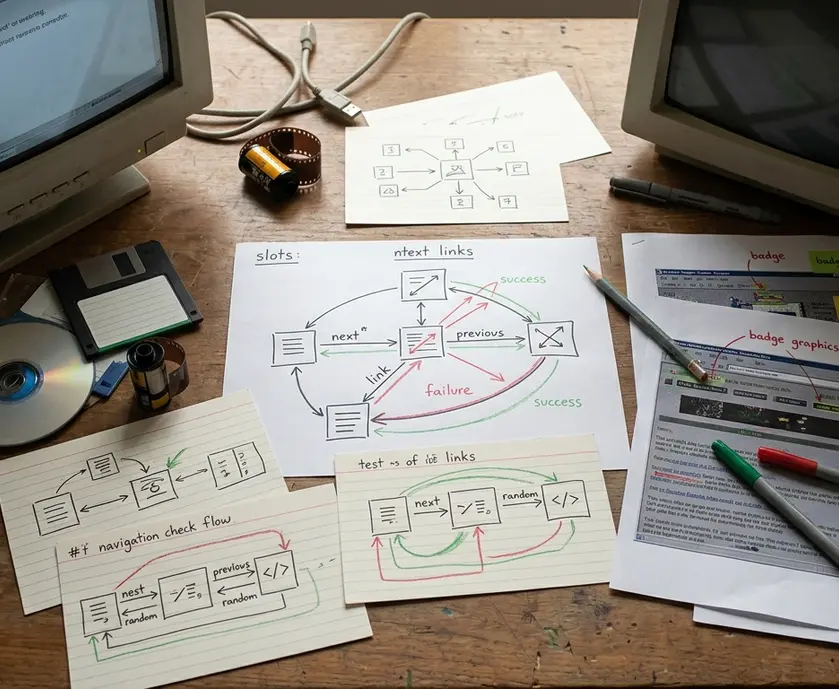
Treating these three states as interchangeable corrupts your documentation. A homepage can load briskly from a modern server while its ring links point to a dead broker. Conversely, a ring's next and previous links might successfully route you between three surviving static pages that have not been touched by their owners in twenty years. Treat a visible copyright year, a CSS redesign, or a surviving graphic badge as an isolated observation on that specific page, never as proof that the broader ring is actively maintained.
Test the previous control and the next control as two separate navigation checks, and inspect the member-list link as a third observation when that control exists. For every link you activate, log four data points:
- Control label: The exact visible text or alt attribute (such as "Next", "Prev", or "List Sites").
- Requested destination: The raw href URL copied from the page source before clicking.
- Final destination: The actual URL where the browser lands after server redirects settle.
- Observed result: Categorized strictly as relevant member reached, broken destination, unrelated redirect (such as a parked domain), or member list opened.
Record broken links and unexpected redirects in your notes instead of quietly skipping them, as a recurring redirect to a specific domain registrar often explains what happened to the ring's central script. When summarizing your findings for a newsletter archive, use precise, time-bound phrasing such as "navigation worked when checked on [actual date]" or "member page survives, but ring navigation failed." Leave those date fields blank in your templates until you execute a real live check. A spot-check establishes what happened on the tested pages and routes at the recorded time, rather than certifying the condition of every member or the ring's ongoing maintenance.
Work Through an Astronomy Webring Search From Query to Bookmark
The following procedure is a demonstration workflow designed to be copied and executed for your own research; it is an operational template rather than a report of pre-verified search results. By walking through an astronomy example from initial query to final bookmark log, you can apply the same procedure to any niche topic or local directory you wish to excavate.
Step 1: Execute the sequential footprint queries. Run astronomy "webring" in your search engine. If that initial pass produces no useful lead, run astronomy "web ring", and if results remain empty, run astronomy "join this ring". Before advancing to the next step, verify that a result qualifies as a promising lead: it must be a personal page, a curated links page, or a ring membership page containing an identifiable ring name or visible navigation controls.
Step 2: Inspect the member page and capture raw addresses. Open the relevant personal astronomy page and scroll to its footer or sidebar to locate its ring badge, member-list link, or previous and next controls. Record the exact ring name as written on the page alongside the original navigation URL embedded in the HTML code, resisting the temptation to normalize spellings or invent a cleaner title.
Step 3: Pivot on the recovered ring name. Take the exact ring name transcribed in Step 2 and run it as a quoted phrase alongside astronomy in a fresh search query to locate sibling member pages that may have dropped the generic word "webring" from their footers. If the original page sits on a multi-user community server, run a parallel test using site:example.org "webring" (substituting the actual host domain) to see if other amateur astronomers on that server joined the same loop.
Step 4: Test live routing and consult the archive if blocked. Click the previous, next, and member-list controls on the live page and log the final destination URLs. If the astronomy homepage still displays its ring badge, but the recorded previous or next destination fails, preserve the homepage in your bookmarks as a surviving member rather than silently counting the ring as functional. Take the broken hub or navigation URL, submit it to the Wayback Machine, and check an available capture to extract original member URLs from the historical roster—remembering that a member page opening inside a historical capture is evidence of preservation, whereas present-day availability requires opening the extracted original member URL outside the archive.
Step 5: Populate a permanent bookmark record. Copy the plain-text block below into your notes or bookmark manager, leaving the factual fields blank until you observe the results directly and filling the checked date with your actual live inspection date rather than an archive timestamp:
interest: astronomy ring name: member URL: original hub URL: checked date: navigation outcome: archived lead:
For an astronomy homepage that loads while its previous and next links fail, the bookmark note would read navigation outcome: member page survives; previous and next destinations broken, alongside the actual inspection date. The saved homepage remains a useful astronomy bookmark without being counted as evidence of a working ring.